How to Bypass Screenshot Restrictions — What You Should Know and Legal Alternatives
Sometimes when trying to take a screenshot, a user encounters a restriction message or gets a blank image instead. This often happens in banking apps, corporate services, online platforms, or when working with protected content. It’s important to understand that in most cases, screenshot restrictions are intentional and related to data security.
Why Screenshot Restrictions Exist
Restrictions are usually applied for the following reasons:
. Protection of personal and financial data
. Compliance with corporate security requirements
. Protection of copyrighted or licensed content
. Prevention of confidential information leaks
Such limitations are implemented at the application or system level and do not depend on a specific key or screenshot program.
Why You Should Not Try to Bypass Protection
Attempts to technically bypass restrictions may violate user agreements, company policies, or even the law. In addition, such actions can lead to account suspension, loss of access to the service, or device security issues.
Instead of trying to bypass protection directly, it is safer and more appropriate to use permitted ways to obtain the necessary information.
Legal Alternatives to Screenshots
In many cases, restrictions can be addressed not technically, but organizationally or functionally:
. Use built-in export or save features if provided by the service
. Copy text data when allowed
. Request official reports, statements, or documents
. Capture screenshots of permitted screens without restrictions
. Use demo or test modes of applications
These approaches do not violate rules and are suitable for work or study tasks.
When Screenshot Applications Are Helpful
If there is no restriction but standard methods are inconvenient, specialized applications can help. They do not bypass protection but provide more control over screen capture and editing in permitted scenarios.
One such tool is SleekShot. It is useful in allowed situations — for creating instructions, educational materials, presentations, and client support content.
How SleekShot Helps in Permitted Scenarios
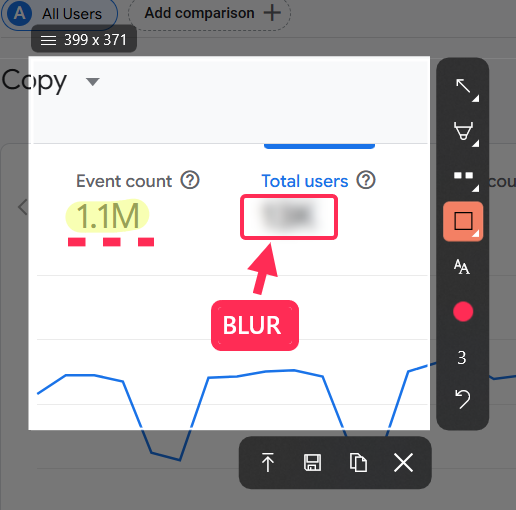
SleekShot allows you to:
. Quickly capture screenshots where it is permitted
. Edit images immediately and hide unnecessary data
. Add explanations, arrows, and text
. Save or share the result in a convenient way
This is especially important when preparing visual materials carefully and responsibly, without risking information leakage.
Conclusion
Screenshot restrictions are not technical errors but data protection measures. Attempting to bypass them can lead to unwanted consequences. It is much more reasonable to use permitted methods of obtaining information and work with screenshots only where allowed. In such cases, SleekShot becomes a convenient and reliable tool that simplifies screen capture and helps prepare clear visual materials without violating rules.